
Why Does Every New Car Feel Like a Smartphone?
About this episode
Modern cars increasingly feel like smartphones because they rely on software, connected services, and phone-style ecosystems. The hosts compare “bring your own device” setups like Apple CarPlay/Android Auto with more closed “walled garden” approaches, then dig into the tradeoffs: native connectivity can drop, voice assistants can struggle, and even updates can depend on cellular coverage. They also cover how over-the-air fixes and key fob updates work, plus the privacy and account-reset steps needed when you sell a connected car.
In this episode of Talking Cars, we discuss why modern vehicles rely so heavily on software, apps, over-the-air updates, and smartphone integration. We compare the pros and cons of Apple CarPlay and Android Auto, discuss the learning curve of built-in infotainment systems, and explore personal data privacy and how you can best protect your information while using a vehicle.
Join CR at https://CR.org/joinviaYT to access our comprehensive ratings for items you use every day. CR is a mission-driven, independent, nonprofit organization.
SHOW NOTES
-----------------------------------
0:00 - Intro
01:20 - CarPlay vs. Native Infotainment Systems
02:20 - Why Connectivity Still Fails
03:40 - Software Updates, Over-the-Air updates
07:04 - Why EVs Depend on Advanced Software
10:50 - Common Infotainment Frustrations
18:20 - What Makes a Good Infotainment System?
20:25 - Privacy, Data Collection & Connected Cars
----------------------------------
How Do In-Car Infotainment Systems Compare to Apple CarPlay and Android Auto?: https://www.consumerreports.org/infotainment-systems/in-car-infotainment-systems-vs-apple-carplay-android-auto/?EXTKEY=YSOCIAL_YT
How Do Over-the-Air Update Work: https://www.consumerreports.org/cars/car-maintenance/ota-car-software-updates-are-they-safe-how-they-work-a4081157745/?EXTKEY=YSOCIAL_YT
How Long Does It Take to Charge These Popular Electric Cars?: https://www.consumerreports.org/cars/hybrids-evs/fastest-charging-electric-vehicles-a4112188427/?EXTKEY=YSOCIAL_YT
Get the Most From Your Car's Infotainment System: https://www.consumerreports.org/cars/automotive-technology/get-the-most-from-your-cars-infotainment-system-a1056374937/?EXTKEY=YSOCIAL_YT
How to Clear Your Personal Data From a Car: https://www.consumerreports.org/electronics/personal-information/how-to-clear-your-personal-data-from-a-car-before-selling-a2082502452/?EXTKEY=YSOCIAL_YT
software defined
"“Your this car is software defined, right?”"
It means the car’s behavior and features are controlled mostly by software. So instead of everything being “hardwired,” the car can feel like it’s running apps and can change over time.
“Software defined” means the car’s key functions and user experience are controlled primarily by software rather than fixed hardware. In practice, that often shows up as frequent feature updates, configurable behavior, and a heavy focus on screens and connectivity.
infotainment system
"“But yeah, then you definitely have others that it doesn't seem like they invest maybe so much into their infotainment system.”"
An infotainment system is the car’s main screen and controls for music, maps, and phone features. It’s what makes the dashboard feel like a phone interface.
An “infotainment system” is the car’s integrated platform for media, navigation, phone connectivity, and other information. It’s the part of the dashboard that makes the car feel like a smartphone because it hosts apps, menus, and screens.
GM 2028
"“And we're also starting to see GM 2028 right. They're going to drop this…”"
GM is the automaker General Motors. The “2028” reference is about what GM plans to do with car software/connectivity in the future.
GM refers to General Motors, and the “2028” mention is about the company’s future direction for in-car software and connectivity. In this context, it’s tied to whether GM will support phone-mirroring features like CarPlay/Android Auto.
Apple CarPlay
"“So I think anyone who's watching this is probably familiar with Apple CarPlay Android Auto.”"
Apple CarPlay lets your iPhone show certain apps on the car’s screen. It’s meant to keep things familiar—like using your phone, but through the dashboard.
Apple CarPlay is a phone-to-car integration system that mirrors compatible iPhone apps onto the car’s display. It’s designed so you can use familiar app icons and controls while driving, which is why the car can feel like a smartphone.
Tesla
"“That's Tesla never had it.”"
Tesla is an EV brand known for building its own in-car software experience rather than relying on phone-mirroring platforms. The host’s point is that Tesla “never had” CarPlay/Android Auto, which is part of why some cars feel more like a self-contained computer.
Rivian
"“Rivian A few of the other EV manufacturers like you said, kind of went their own direction.”"
Rivian is an electric-vehicle brand. The host is using it as an example of an EV company that chose its own software approach instead of using the standard phone integration.
Rivian is an EV brand that, like Tesla, has emphasized its own software and user experience. In this segment, it’s mentioned as an example of an EV maker that “went their own direction” instead of using the mainstream phone-integration approach.
native system
"[127.7s] Do you just want do you want to live with native? [130.2s] Oh screen native function and features, or do you want it all based on your phone because you're sort of an expert in this and I know what I think..."
The “native system” is the car’s built-in screen and software. It can use its own internet connection to show navigation and other features.
In-car infotainment, the “native system” means the vehicle’s own built-in software and services (like navigation and apps) running inside the car. It typically relies on the car’s own internet connection (cellular or Wi‑Fi) to get map data and traffic.
Wi-Fi connectivity
"[145.9s] Because the native system is going to rely on a, an internal, like Wi-Fi connectivity or cellular connectivity, and then your own phone is going to be either on Wi-Fi connected to the vehicle or a hotspot or a cell phone."
Wi‑Fi connectivity means the car can use the internet through a Wi‑Fi network. If you’re using your phone as a hotspot, the car’s navigation depends on that connection working reliably.
Wi‑Fi connectivity is the car’s ability to connect to the internet via a Wi‑Fi network (often your phone’s hotspot). For navigation and services, it can provide data when cellular coverage is weak, but it depends on the availability and stability of that Wi‑Fi connection.
LTE cellular connectivity
"[145.9s] Because the native system is going to rely on a, an internal, like Wi-Fi connectivity or cellular connectivity, and then your own phone is going to be either on Wi-Fi connected to the vehicle or a hotspot or a cell phone."
Cellular connectivity means the car uses the mobile phone network to get internet access. If you’re in an area with weak signal, the car’s online features can drop out.
Cellular connectivity is the car using a mobile network (like the same networks your phone uses) to send and receive data. It’s what enables live services such as map updates, traffic, and remote features, but it can fail when coverage is poor.
hot spot
"[145.9s] ...your own phone is going to be either on Wi-Fi connected to the vehicle or a hotspot or a cell phone."
A hotspot is when your phone turns its internet connection into Wi‑Fi for the car. It helps the car stay online, but it can be affected by phone signal and battery life.
A hotspot is when your phone shares its cellular internet connection with the car over Wi‑Fi. This can keep navigation and connected services working even when the car’s own connection is unreliable, but it depends on your phone’s signal and battery.
telematics
"[212.5s] So this used to be for things like they'd call it telematics. [223.0s] That would be like, you could look at your phone and unlock your car. [226.7s] You could see if the alarm went off."
Telematics is how a car uses a built-in connection to send information to apps or services. It’s what enables features like remote access and alerts.
Telematics is the use of onboard communications (cellular/GPS) to deliver connected services from the vehicle to a phone or company platform. In the past, it was used for features like remote lock/unlock and alerts, and now it’s being expanded into richer navigation and app-like functions.
built in connection
"[212.5s] So I know that cars nowadays almost every car has, not every but almost every car has a built in connection. [220.2s] So this used to be for things like they'd call it telematics."
A built-in connection means the car has its own way to get online. That can reduce dependence on your phone, but it can still fail if the signal is bad.
A built-in connection is the vehicle’s own integrated cellular/Wi‑Fi hardware and software for staying online. The discussion contrasts it with using your phone as the internet source for navigation and other connected features.
OnStar
"[226.7s] You could see if the alarm went off. [229.3s] This is, you know, OnStar. [230.7s] This is going back to the 90s that these connections would happen..."
OnStar is a service that connects your car to help and remote features. It’s an example of the older generation of “connected car” technology.
OnStar is a connected-services brand associated with General Motors, known for in-car communication and remote vehicle features. The hosts mention it as an example of early “built-in connection” telematics that dates back decades.
over the air
"You can fix a recall, it can get beamed down from the sky and fix the car."
Over-the-air updates are software updates sent to the car wirelessly. That means you may not need to go to a dealership for some fixes.
Over-the-air (OTA) updates let a car receive software changes wirelessly, similar to how phones update apps. This matters because it can fix certain issues without a dealership visit, but it also depends on connectivity and coverage.
recall
"You can fix a recall, it can get beamed down from the sky and fix the car."
A recall is when the car maker says, “There’s a problem—let’s fix it.” Sometimes the fix can be done remotely with software, instead of going to a shop.
A recall is when a manufacturer asks owners to bring a vehicle in (or perform a fix) because of a safety or compliance issue. In this segment, they’re talking about recalls being handled via remote software updates rather than only in-person service.
dead zone
"Right. So there's certain carriers, have dead zones here."
Dead zones are areas where a wireless network signal is weak or unavailable. At a racetrack, dead zones can prevent cars from reliably receiving over-the-air updates or communicating with the network.
key fob
"But I just updated the keyfob for the lucid gravity off of this phone... It got rid of some of the quirks of it."
A key fob is the remote you use to lock and unlock the car. They’re saying the fob itself can get software updates, which can fix problems like it not working reliably.
A key fob is the handheld remote used to lock/unlock and often start modern cars. This segment specifically describes updating the key fob’s software so it works better (less glitchy behavior and improved recognition range).
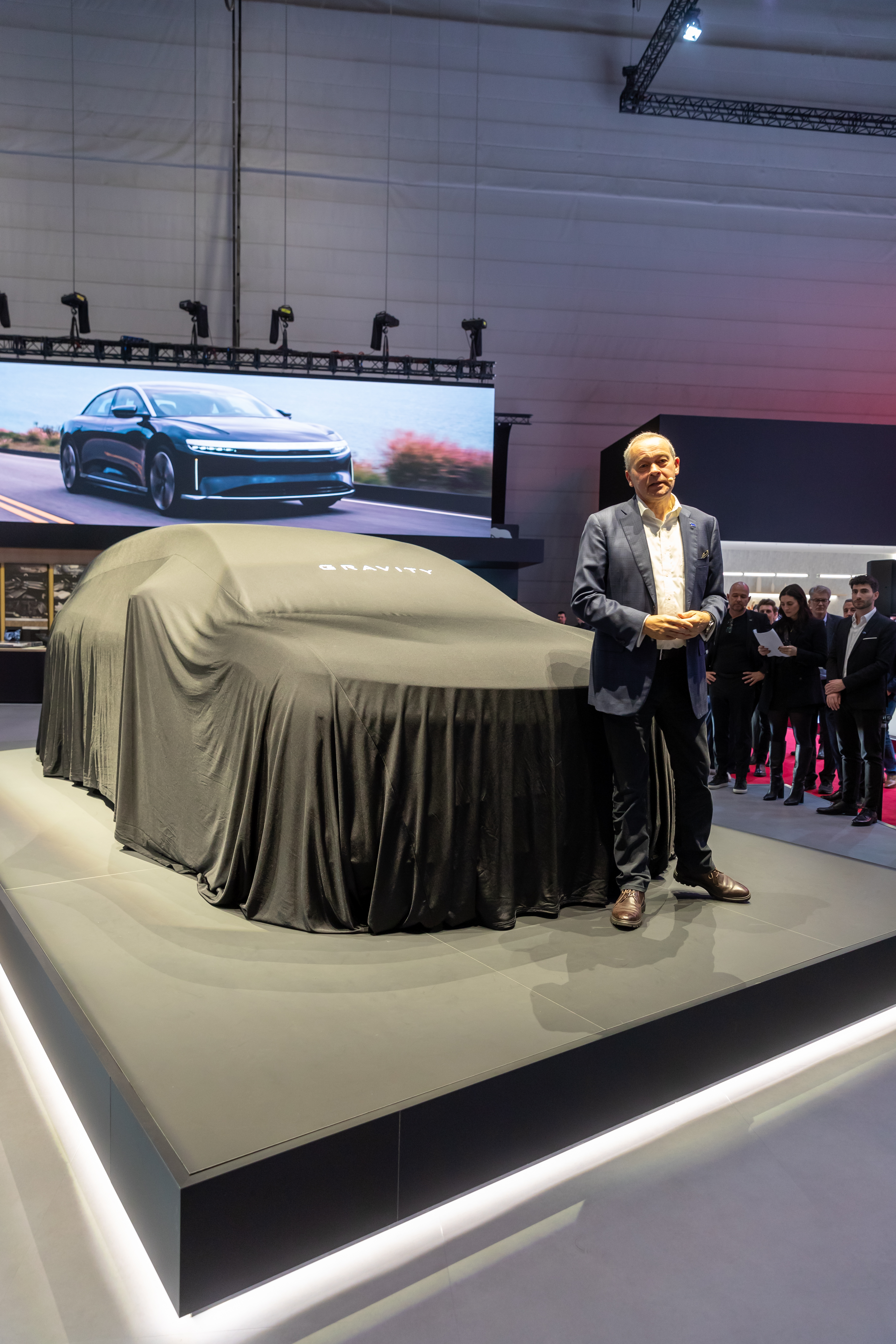
Lucid Gravity
"But I just updated the keyfob for the lucid gravity off of this phone."
Lucid Gravity is Lucid’s SUV. Here, they’re using it to show that newer cars get software updates, and even the key fob can be updated using a phone connection.
Lucid Gravity is Lucid’s SUV model, and in this segment it’s being used as an example of how modern cars rely on constant software updates. The host describes updating the key fob for the Gravity via a phone connection, showing how connected-car features are becoming part of everyday ownership.
lock and unlock button
"It recognizes as you get a little or from a little more distance, the actual lock and unlock button seem to work okay."
Those are the buttons on the key fob that tell the car to lock or unlock. They’re saying the update improved how well those buttons work from farther away.
The lock/unlock buttons are the physical controls on a key fob that send commands to the car’s access system. The host notes that after the update, the buttons work properly when the user is at a slightly greater distance.
software updates
"We've done software updates off of phones. BMW and mini had a system where you download it, and then you have to pair the phone and drive around the matter."
Cars today can get new software after you buy them, like a phone update. That software can add features or fix problems without needing a full repair visit.
Modern cars can receive new software after purchase, similar to how phones get app updates. These updates can change vehicle features, fix bugs, and sometimes improve performance or efficiency.
pair the phone
"BMW and mini had a system where you download it, and then you have to pair the phone and drive around the matter. Once you put you in a car for like four days with this red phone."
Pairing means connecting your phone to the car so they can “talk” to each other. Here, the update won’t work until the phone is connected properly.
Pairing a phone to a car is the setup step that creates a trusted connection between the two devices. In this segment, the speaker describes pairing as part of the process needed before the car can receive and apply an update.
Mini
"BMW and mini had a system where you download it, and then you have to pair the phone and drive around the matter."
MINI is a car brand (part of BMW Group). In this story, MINI is mentioned because its cars can update software using a connected phone.
MINI is a brand under BMW Group, and it’s referenced here as using a phone-pairing workflow for software updates. The key idea is that the update process depends on the phone being connected to the car.
BMW
"We've done software updates off of phones. BMW and mini had a system where you download it, and then you have to pair the phone and drive around the matter."
BMW is a major car brand from Germany. Here, they’re mentioned because their cars can get software updates using your phone connection.
BMW is a German automaker that has offered connected-car software update workflows tied to a paired phone. In this segment, BMW is mentioned as using a download-and-pair process before the car applies the update.
GM cars
"No. Download the GM cars update at my house. They don't update like anywhere else in my house. They work."
GM is a major automaker. The speaker is saying GM’s update process can be done at home rather than needing special trips or a service visit.
GM (General Motors) is referenced as having a software update process that the speaker can do at home. The segment contrasts this with other workflows that require driving around or being physically at a service location.
EV charging
"A lot of it has to do with EV charging and how you plan as you are driving or, planning a trip somewhere."
EV charging is plugging your electric car into a charger to refill its battery. How fast it charges and where chargers are matters a lot for road trips.
EV charging is how an electric vehicle replenishes its battery using an external power source. Charging speed and charger availability strongly affect trip planning because they determine how long you’ll stop and whether you can reach the next charger.
range
"How do you make sure that you have enough range to get to the next station?"
Range is how far the car can go before the battery runs low. For EVs, it’s what determines whether you’ll need to stop to charge.
Range is the distance an EV can travel on a full charge (or on the remaining battery). Because EVs depend on charging stops, range becomes a key input to navigation and trip planning.
charging stations
"How long is it going to take for you to charge there with these? ... to the next charging station."
A charging station is where you plug in your EV to charge it. You plan trips around where these stations are and how long charging will take.
A charging station is a public or private location with chargers that supply electricity to an EV. Trip planning depends on finding the right station and estimating how long charging will take there.
map system
"The integration of the map system, within the EV. Now you have the the maps has access to all of the EV data in your vehicle."
The map system is the car’s built-in navigation. For EVs, it can use your battery info to help plan the route and where to stop to charge.
The map system is the vehicle’s built-in navigation that can use live vehicle and route information. In EVs, it can incorporate battery and charging data to estimate range and suggest charging stops along the way.
EV data
"Now you have the the maps has access to all of the EV data in your vehicle. So it's going to be the range..."
EV data is the car’s battery and energy information. The navigation uses it to figure out if you can make it to the next charger and how long you’ll need.
EV data refers to the information the car collects about its battery and energy usage, such as current state of charge and estimated consumption. Navigation can use this data to calculate whether you’ll have enough range and to plan charging stops.
EV
"And that's not something that you see in every vehicle, but it is something that I like to see, and I like to choose if I'm going to take a road trip in an EV, because that's just my sense of peace of mind."
EV means electric vehicle. Instead of using gasoline, it runs on electricity stored in a battery, and you recharge it at charging stations.
EV stands for electric vehicle, meaning the car is powered primarily by an electric motor and a rechargeable battery. In this segment, the discussion is about planning routes and charging based on battery range.
charging scheduling
"You can also you know, do you charge scheduling? So if you live in a state where charging or electricity costs increase during the daytime, you can have your vehicle charge between like 2 a.m. and 7 a.m.."
Charging scheduling means you tell the car when to start charging. If electricity is cheaper at certain times, you can set it to charge during those windows.
Charging scheduling is a feature that lets you set when your EV should start charging. It’s useful when electricity prices change by time of day, so you can charge during cheaper hours.
voice assistant
"I mean, I think this is this is actually and I'm a bit of a skeptic around certain things that are related to like AI, but I think there's there's this world that I would love to be able to have a voice assistant that's built into the car where I can say, hey, find me a charging station..."
A voice assistant is the feature that lets you talk to your car and ask it to do things. The host is saying it’s not always reliable yet, even for simple requests.
A voice assistant is an in-car system that listens to natural-language requests and tries to carry them out (like finding charging stations). The segment critiques how far these assistants have come—and how they still fail at basic tasks.
AIS
"I'm a bit of a skeptic around certain things that are related to like AI, but I think there's there's this world that I would love to be able to have a voice assistant that's built into the car..."
AI means artificial intelligence—computer “smarts” that can understand and respond to things like speech. Here, it’s about whether the car’s assistant can reliably help you find charging.
AI (artificial intelligence) refers to computer systems that can perform tasks that normally require human intelligence, like understanding speech or interpreting requests. In this segment, AI is discussed in the context of in-car assistants and how well they can plan charging trips.
large language models
"I think they're really dry, and there's a lot of like systems that are using, looms, large language models and they're getting there to be a lot more conversational."
Large language models are AI tools that can understand and respond to human language. The host’s point is that they’re improving how the car talks with you, but they’re not perfect yet.
Large language models (LLMs) are AI systems trained on huge amounts of text so they can understand and generate human-like language. The host suggests these models are making voice interactions more conversational, but still not consistently dependable in cars.
voice control
"it would not narrow it down over voice control. I had to go in there and and but I mean, the system, if I had set it up, it would have figured it out for me."
Voice control lets you talk to the car to do things like find directions or charging stations. The host says the system didn’t work well enough to get the right charging option.
Voice control is the ability to operate the car’s infotainment and navigation features using spoken commands. Here, the host describes a case where voice control couldn’t narrow down charging locations on the fly.
fast charger
"I was just in the Lexus ES, EV and was trying to find a place, to charge for the fast charger, and it would not show me."
A fast charger is a charger that recharges an EV quicker than a regular one. In this segment, the problem is that the car couldn’t find the fast charging spot when asked.
A fast charger is a high-power EV charging setup designed to add significant battery range in less time than standard charging. The host’s issue is that the car’s system couldn’t reliably surface or narrow down fast-charging options.
Bluetooth
"The only cars that are on my own personal phones Bluetooth list are the cars that are actively in test, because those are the cars I spend most of my time in."
Bluetooth is a wireless link between your phone and the car. It lets the car and phone “talk” so you can use things like music and calls without plugging in a cable.
Bluetooth is a short-range wireless connection used to link your phone to the car for features like calls, music control, and sometimes navigation/app data. In cars, it’s often used for hands-free audio and media streaming without plugging in a cable.
wired connection
"And I also feel like if it was my own personal vehicle, I would use a wired connection. Yeah, I would have the cable."
A wired connection means plugging your phone into the car with a cable. It usually works more reliably than wireless, but you have to deal with cables and the right connector.
A wired connection means using a physical cable between the phone and the car’s USB port for data and charging. Compared with wireless links, wired connections are often more stable and can avoid pairing/connectivity issues, but they require the right cable and can be inconvenient.
USB-C
"Yeah, I would have the cable. It's the right cable, but some cars have usb-C, some have a I just never have the right cable, or I leave it in the car."
USB-C is a common charging/plug type that works both ways (you can plug it in either orientation). Some cars use USB-C, so you may need the right cable to charge and connect your phone.
USB-C is a modern, reversible charging/data connector shape. Many cars use USB-C ports for phone charging and for wired smartphone integration, but cable compatibility can be annoying if your phone or accessories use a different connector.
charging to 100%
"And if you're like me and you don't want your phone to charge you 100% because it's bad for the battery or it's just going to get it hot, yeah, then I don't want to actually plug it in, but I want the stable connection for that cord."
Charging to 100% means topping the phone battery all the way up. Some people avoid doing that often because it can make the battery age faster, especially if it also gets hot.
Charging a phone to 100% refers to keeping the battery at a full state of charge. Many people try to avoid frequent full charges because higher battery temperatures and high state-of-charge can accelerate battery wear over time.
wireless charging
"But yeah, you know, we have wireless charging that gets the phone hot in a lot of cars as well. Never any cars have a good wireless charger. Yeah. So it slides off."
Wireless charging charges your phone without plugging in a cable. You set the phone on a pad, but it can get hot and sometimes won’t charge well if the phone isn’t positioned correctly or if you have a thick case.
Wireless charging in cars uses an inductive pad in the center console to charge your phone without plugging in a cable. It can generate heat, and the phone may not stay perfectly aligned—especially with certain cases—leading to reduced charging or the phone “sliding off.”
Google Meet
"So it seems like we're having more problems because we're really utilizing that, you know, like taking a Google Meet from the car, that kind of a thing."
Google Meet is a video-calling app. The point here is that some cars can connect to apps like this, which makes the in-car system feel more like a smartphone than a dashboard.
Google Meet is a video-conferencing service that can be used through a car’s connected infotainment system when the platform allows it. The discussion uses it as an example of how modern cars can support “work” apps, not just driving-related functions.
navigation apps
"Now you can have games which typically you you can't do while you're driving. Yes, but there's that capability and there's a bunch of different navigation apps, kind of thing."
Navigation apps are map programs on your phone that guide you with directions. Newer cars can show and control them through the car screen, which makes the whole driving experience feel more like using a phone.
Navigation apps are smartphone-based mapping programs that provide turn-by-turn guidance and traffic-aware routing. In modern cars, these apps can be integrated through platforms like CarPlay and Android Auto, which is why the driver experience can feel “app-like” rather than purely vehicle-based.
Spotify
"There's just so, so much going on, you know, Spotify. Yeah. Any music streaming thing."
Spotify is a music streaming app. When it works through your car’s screen, it’s one more example of how your car is starting to behave like a phone hub.
Spotify is a music streaming service that’s commonly integrated into car infotainment systems via phone projection or built-in apps. Its mention highlights how cars increasingly rely on external app ecosystems for media rather than traditional radio-only experiences.
Waze
"Yeah. Even if I'm not following the directions, I'm a Waze person, so I run Waze just for the alerts, right?"
Waze is a navigation app that uses other drivers’ reports to warn you about things like accidents or debris. Some people use it mainly for alerts rather than for the exact route it suggests.
Waze is a community-driven navigation app that emphasizes real-time alerts like traffic slowdowns and hazards reported by other drivers. The speaker prefers using it for alerts even when not following its full route guidance.
Google Maps
"You put your destination on Google, but you have Waze up on the screen... And then I have, so yeah, and then I have Google Maps in the background."
Google Maps is a phone navigation app that tells you where to go and how to get there. Here, the host uses it for directions even while another app is shown on the main screen.
Google Maps is a navigation app that provides route guidance, traffic-aware directions, and destination search. In this segment, it’s used as the “background” navigation while the host prefers Waze for the main on-screen guidance.
Android Auto
"You're looking for things where an Android Auto or CarPlay, you just have like the 3 or 4 tiles on the side."
Android Auto is a way to connect your Android phone to your car. It shows certain phone features on the car screen so you can use navigation and music more easily while driving.
Android Auto is a smartphone-to-car interface that lets you use selected Android phone apps through your car’s infotainment screen. It’s designed to keep the most-used functions (like navigation and music) easy to access while driving.
walled garden
"Yeah, which is why I think there is that. I think, you know, I see why GM would want you in their walled garden."
A “walled garden” means a system where one company controls the experience. In cars, it can mean your phone features work in a limited, controlled way instead of completely freely.
A “walled garden” describes a closed ecosystem where a company controls what apps and data can be used and how. In cars, it often means the automaker prefers keeping functions inside its own software environment rather than fully exposing everything to the driver’s phone.
privacy wise
"It also means that there's more information they can take from you and we know we've seen there's been some investigations about, you know, settings that might look innocuous privacy wise, that if you leave it on, suddenly your insurance rates go up suddenly, someone knows,"
They’re talking about privacy in the sense of what the car collects and shares. Even if it sounds minor, it can still be used to make decisions about you later.
“Privacy-wise” here refers to how data collection can seem harmless at first (like settings or usage data) but still enable tracking or profiling. The host is arguing that leaving certain features enabled can lead to downstream effects.
insurance rates
"settings that might look innocuous privacy wise, that if you leave it on, suddenly your insurance rates go up suddenly, someone knows,"
Insurance rates are how much you pay for car insurance. The host is suggesting that car data might change those prices.
“Insurance rates” are the premiums an insurer charges, which can sometimes be influenced by risk signals. The host’s point is that vehicle data or settings could potentially affect pricing.
adaptive cruise control
"Like lane centering and adaptive cruise control. If you turn off some privacy settings in a certain vehicle."
Adaptive cruise control is cruise control that can react to traffic. If a car in front slows down, your car slows too, and then resumes speed when the road clears.
Adaptive cruise control (ACC) automatically adjusts your speed to maintain a safe following distance from the car ahead. Unlike basic cruise control, it can slow down and speed back up using sensors such as radar or cameras.
lane centering
"Like lane centering and adaptive cruise control. If you turn off some privacy settings in a certain vehicle."
Lane centering is a system that helps keep your car in the middle of the lane. It uses sensors to detect lane lines and makes small steering corrections so you don’t drift.
Lane centering is an advanced driver-assistance feature that uses cameras and/or sensors to keep the car roughly centered in its lane. It typically works by steering gently to correct for drifting, often as part of a broader “lane keep assist” package.
HD mapping data
"I mean, you're supposed to have be using like HD mapping data, but that's something that is like downloaded into the vehicle."
HD mapping data is a very detailed digital map that helps the car understand the road better. Instead of guessing, the car can use this information to assist features like navigation and driver-assist systems.
HD mapping data is highly detailed digital map information used by driver-assistance and navigation systems. It can include lane-level geometry and other road details, and the transcript suggests it’s downloaded into the vehicle rather than continuously streamed.
OEM
"And so there's no reason apart from I think just being able to, analyze when people are using what at the OEM, level. Yeah, yeah."
OEM means the carmaker itself—the company that built your vehicle. Here, it’s being used to talk about what the automaker can learn or analyze from the car’s systems.
OEM stands for “original equipment manufacturer,” meaning the automaker that built the vehicle. In this context, the speaker is talking about analyzing vehicle usage at the automaker level.
native Google system
"So a lot of cars now have a native Google based system, and they can connect to if you're in the Google versus if you have a Gmail account, it can you can log in with your Gmail account in the car."
This means the car has built-in Google features, not just a phone app. You can sign in with a Google account and the car can use that info to show things like reminders or route-related timing.
A native Google-based system refers to an in-car infotainment/software platform that’s built around Google services rather than relying only on a phone connection. The transcript describes logging in with a Google account and getting personalized context-based suggestions.
vehicle app account unlinking
"And then when you sell the car, you need to get the car out of the account and there's all this kind of stuff to do. [1466.8s] You don't want to sell a car then."
When you sell a connected car, you have to remove it from your phone/app account. If you don’t, your phone can still reconnect and you may still see alerts or control features.
The segment describes the need to remove a sold car from the owner’s digital account so the previous owner no longer has control or visibility. If the car remains linked, the car can still reconnect to the prior owner’s phone/app and generate notifications.
total vehicle
"And that car, the parts went away to a different country. [1506.3s] This happened several times. [1507.3s] And cargos. Yeah. [1508.8s] The whole car went and it was a total vehicle."
“Total vehicle” usually means the car was damaged so badly that it’s not worth fixing. Insurance treats it as a write-off, and it may be sold for parts or salvage.
A “total vehicle” is an insurance designation meaning the car was damaged enough that repairing it would cost more than it’s worth. In that situation, the vehicle is typically written off and handled through salvage or parts channels.
lock and unlock wire
"You sell. Whoever has, [1529.1s] you know, that has connectivity to what you can lock and unlock. Yeah."
Some cars can be controlled with an app on your phone. The app can tell the car to lock or unlock the doors remotely.
This refers to remote keyless access features where a car can be controlled from a phone app. In practice, the app sends commands to the car’s connectivity system to lock or unlock the doors.
factory reset
"We do a factory reset on the cars before they go, the way we get them out of the account, sometimes it's very easy."
A factory reset is like rebooting the car’s computer back to its original settings. Here, it’s used to make sure the car is no longer tied to the previous owner’s account.
A factory reset is a procedure that restores a car’s infotainment/telematics system back to its default settings. In this context, it’s used to wipe the car’s account association before the vehicle is released from a customer’s ownership profile.
Toyota
"Toyota is like two clicks in the app and the car is gone."
Toyota is a major automaker whose connected-car workflow is described as being quick to remove from an app account. The host says it can be done in “two clicks,” highlighting how different brands handle telematics/account management.
SiriusXM
"When you call, you actually end up talking to Sirius XM is the company that's administering this for the for its Stellantis products?"
Sirius XM is a company known for satellite radio. In this case, they’re also involved in the connected-car system that handles account and vehicle access.
Sirius XM is a satellite-radio and connected-services provider. In the transcript, it’s described as administering the connected-car process for Stellantis vehicles, meaning it helps manage the telematics/account side of the car.
Stellantis
"Sirius XM is the company that's administering this for the for its Stellantis products?"
Stellantis is a big car company group that makes many different brands. Here, they’re mentioned because their cars use a connected system that Sirius XM helps manage.
Stellantis is an automaker group that owns multiple brands and designs connected-car systems across its lineup. The transcript links Stellantis products to Sirius XM for administering the connected-car account process.
Jeep
"Speaking of talking to Sirius XM to just tell them that you've sold your Jeep or whatever it is. We just did it with the Jeep, actually."
Jeep is a car brand. They mention a Jeep because it’s an example of a car you’d need to properly remove from your account when you sell it.
Jeep is a brand within Stellantis, and the transcript uses a Jeep sale as an example of why the connected-car account needs to be handled correctly. The point is to prevent the next owner from inheriting access or data tied to the previous owner’s profile.
fuel
"I could see how much fuel was in it."
Here, “fuel” means the app can show you the car’s fuel level remotely. That’s part of the connected-car system, not just something you check in the dashboard.
In this context, “fuel” is part of the connected-car data the app can display remotely. The host describes seeing how much fuel was in a car from the app, which is a telematics feature rather than a normal everyday “fuel” mention.
lock unlock
"all these things I could lock unlock it, and it's kind of scary."
Lock/unlock means you can lock or unlock the car using your phone. The concern is that if the account isn’t removed properly, someone could potentially control the car remotely.
“Lock/unlock” refers to remote access features that let you control the car’s doors from a phone app. The transcript frames it as potentially scary because it demonstrates how much control an app account can have over a vehicle.
Request an Explanation
Heard something you'd like explained? We'll add it to this episode.
Sign in to request explanations for terms you heard.
Want to learn more?
Browse our glossary for plain-English explanations of automotive terms, jargon, and concepts.
Help improve this episode
See something that's not quite right? Our annotations are AI-generated and can sometimes miss the mark. Click the flag icon on any annotation to suggest a correction.